
PFR Sentinel: From Pier Anxiety to a Purpose‑Built Tool

TL;DR
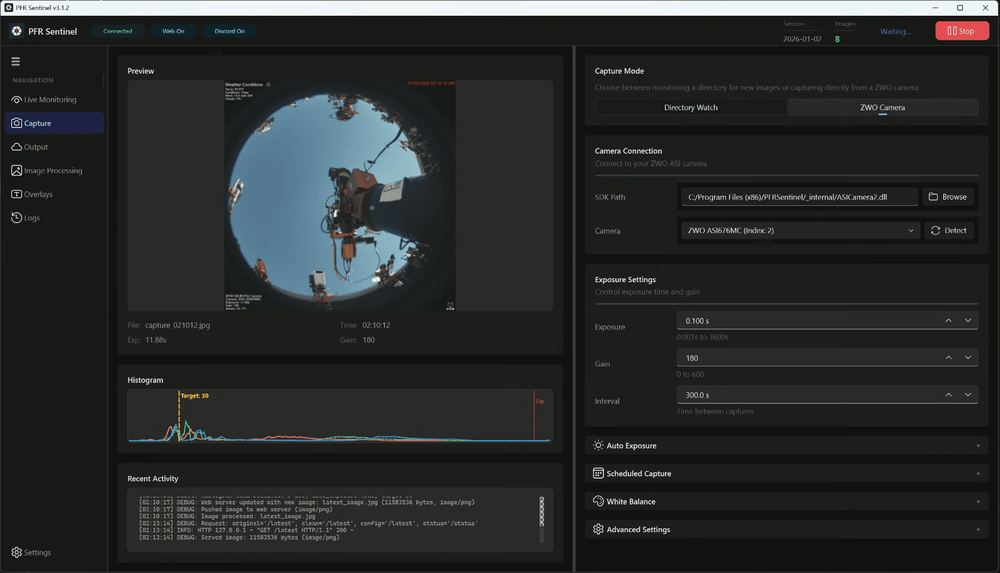
I built PFR Sentinel because I was tired of logging into a remote observatory PC just to see if everything was okay. What started as a small script grew—through vibe coding, community feedback, and an AI coding partner—into a focused, open‑source pier camera app that captures, overlays, and publishes images with minimal friction.
The problem: remote observatory anxiety
Running a remote observatory is amazing — until it isn’t.
Most of the time, all I really wanted was a simple answer to a simple question:
What does my pier look like right now?
Is everything still powered on? Is the scope parked? Did the weather roll in? Is something obviously wrong?
Answering those questions usually meant logging into a remote desktop session, waiting for things to load, opening the right application, and then finally seeing what was going on. It worked, but it was friction I felt every single night.
I didn’t want control. I didn’t want configuration. I just wanted eyes on the pier.
Early experiments (and why they didn’t quite stick)
AllSkEye
I started with AllSkEye (https://allskeye.com/). It sort of worked. I could connect to a pier camera, and it clearly had a lot of power behind it.
But that power came with complexity.
There were a thousand options, menus, and settings — many of which I didn’t need for this use case. Some of the features I wanted lived behind a paywall. I’m not opposed to paying for good software, but the overall experience felt heavy for what I was trying to accomplish.
One issue I could never quite solve was color. No matter how much tweaking I did, I could never get the image to look right in a way that felt reliable.

ASICap
Then I tried ASICap.
This actually worked really well for capture. The camera connected quickly, images came through reliably, and it did exactly what it said on the tin.
The problem was everything after capture.
I wanted to use the pier image in multiple places:
- a snapshot in Discord
- a local dashboard view
- and eventually on PFRAstro
ASICap saved files to a folder. Getting those images from disk into Discord, a web server, and a dashboard meant cobbling together scripts, scheduled tasks, and hope. It worked, but barely.

The first real win: ASIOverlayWatchDog
The first real breakthrough came with a small idea:
What if I just watched the images ASICap was already producing, added an overlay, and published them to Discord?
That idea became ASIOverlayWatchDog.
It was intentionally simple:
- watch a directory
- grab the latest image
- add useful overlay information
- push it somewhere I could glance at it
And it was GREAT.

For the first time, I could casually check my pier from my phone without logging into anything. That alone felt like a huge quality‑of‑life improvement.
But as often happens, once it worked… I wanted more.
From script to system
At some point, watching files started to feel like a hack.
I wanted the application to own the capture process instead of reacting to whatever another tool happened to write to disk.
This was the point where ASIOverlayWatchDog stopped being a script and started turning into a real application. I leaned fully into a vibe‑coding workflow and began interfacing directly with the ASI SDK so the app could talk to the camera itself.
That single change unlocked everything.
Instead of passively waiting for files, the app could:
- run quietly on my desktop
- capture images on its own schedule
- process them immediately
- and publish them wherever I wanted
To make that useful remotely, I added a small web service so images and status could be accessed without needing to remote into the machine at all.
This was the prize: a lightweight app that just ran, and occasionally checked in with me.
Building PFR Sentinel (with an AI agent)
This is where the project really accelerated.
PFR Sentinel was built using what I’ve come to think of as vibe coding: a tight feedback loop between human intent and an AI coding agent. I’d describe what I wanted in plain English, the agent would generate code across the app, I’d run it against real hardware, find the sharp edges, and we’d iterate.
The division of labor settled into something like this:
- I owned the product vision, priorities, and UX decisions
- The agent handled large chunks of implementation, plumbing, and refactoring
- I tested everything against an actual pier camera
- The agent handled first‑pass fixes, API lookups, and code organization
The AI was incredible at scaffolding features quickly and keeping the codebase consistent. But all the taste‑based decisions — what felt right, what was worth building, and when to stop — still came down to human judgment.
Lesson learned: AI agents are force multipliers, not replacements. They can build fast, but they can’t decide what’s worth building.

Vibe coding, refined by community
By this point, the app was working well and mostly bug‑free, so I shared it with a few pier friends at SFRO to see if anyone else found it useful.
They did.
Every so often, someone new would join, try it out, and ask for something small. I’d add it. Another person would test that change and suggest an improvement. That feedback loop shaped the app in ways I wouldn’t have predicted.
Thanks to the SFRO community, Sentinel grew features that made it far more robust and usable:
- better image file handling
- responsive layouts
- more advanced web server options
- improved thread management for long‑running tasks
- auto‑stretching to make short exposures usable
The app genuinely wouldn’t be what it is today without that feedback.
From ASIOverlayWatchDog to PFR Sentinel
Eventually, it became clear that my “small, single‑use” app wasn’t so small anymore.
ASIOverlayWatchDog had outgrown its name — and honestly, I wanted to move away from ZWO‑centric branding entirely. What started as a narrow utility had become something I relied on nightly, and it deserved to feel more intentional and cohesive.
That marked the start of v3.
Version 3 introduced:
- a new name: PFR Sentinel
- a new logo and visual identity
- a more cohesive design language
- and a new Python GUI framework that finally made the app feel… grown up
It no longer felt like something held together by duct tape and good intentions.
At the same time, the app itself had matured.
Today, PFR Sentinel is:
- slick
- intentionally simple
- easy to use when you want it to be
- capable when you need it to be
- open source
- and driven by community feedback
Under the hood, it can capture directly from a ZWO ASI camera or watch a directory, add dynamic overlays (including weather data), and publish the result simultaneously to disk, a local web endpoint, Discord, or even a live RTSP stream.
But the real value isn’t the feature list.
It’s the confidence that my remote pier is doing what I expect it to be doing — without me having to log in and check.

What’s next
There’s still plenty I want to explore:
- quality‑of‑life improvements like browsing recent images
- introduce a new abstracted camera layer, that would allow the introduction of new integrations
- and eventually a more polished public release with docs and installers
The roadmap will continue to be shaped by real‑world use and community feedback.
Closing thoughts
I’m excited to finally share PFR Sentinel v3 more openly.
It’s the result of real frustration, iterative experimentation, community input, and a lot of late‑night vibe coding — with an AI agent acting as a surprisingly effective coding partner along the way.
If you run a remote observatory and have ever felt that low‑grade anxiety of “I just want to check on things”, this project is for you.
More to come.
If this resonates, you can download the latest release or browse the full release notes on GitHub:
👉 https://github.com/englishfox90/PFRSentinel/releases
You can also drop a comment or reach out on the usual astrophotography forums — I’d love to hear how others are solving the same problem.
Clear skies. 🌌
Discussion
Loading